
HBCSE Mail Clients Configuration
IMAP and SMTP settings for your email app, plus a step-by-step Thunderbird setup.
Server settings
Use these values in any mail client.
| Field | Incoming settings (IMAP) | Outgoing settings (SMTP) |
|---|---|---|
| Username | Your HBCSE username | Your HBCSE username |
| Password | Your password | Your password |
| Server | imap.hbcse.tifr.res.in | smtp.hbcse.tifr.res.in |
| Port | 143 | 587 |
| Security type | STARTTLS | STARTTLS |
Set up Thunderbird
- To create a new mail account, click the menu File → New → Mail Account.
- Add your name, email address and password in this screen.
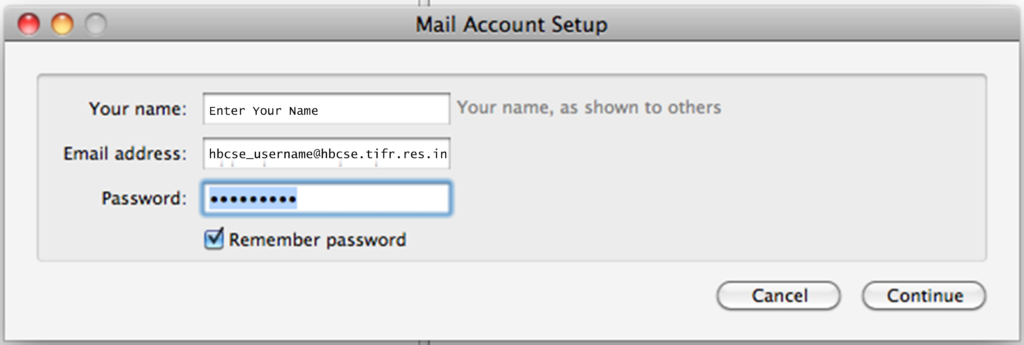
- Click Continue. Thunderbird will detect the IMAP and SMTP servers automatically.
- The login username must be your full email address. Click
Editto make sure it is correct.
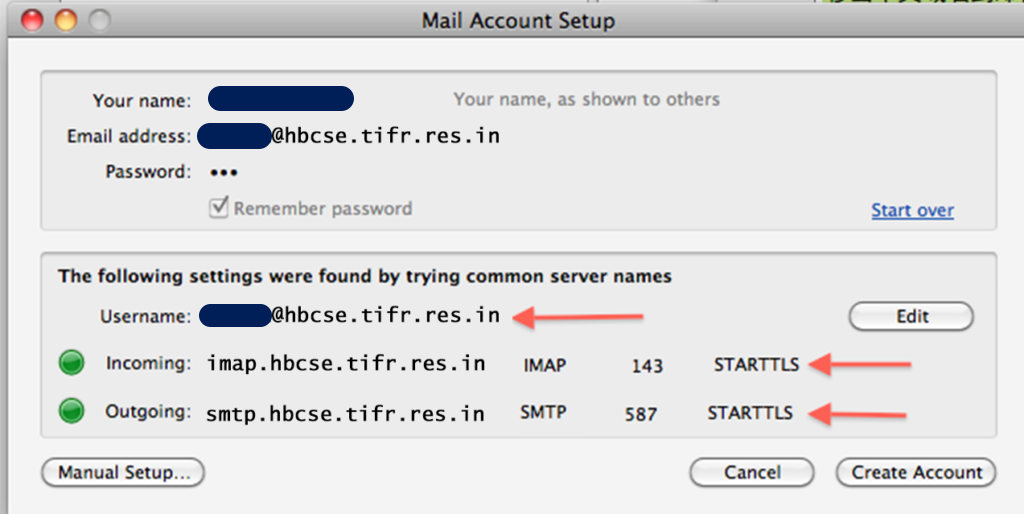
- The login username must be your full email address. Click